
Choosing the Right Office Printer for Your Business
Choosing the right office printer can have a bigger impact on your workplace efficiency than most businesses realize. The right device can streamline workflows, reduce printing costs, improve document security, and minimize downtime. On the other hand, the wrong printer can lead to constant maintenance issues, wasted supplies, and slow productivity.
From contracts and invoices to internal reports and marketing materials, reliable printing is essential. A well-chosen office printer becomes an integrated part of your technology ecosystem rather than a daily frustration.
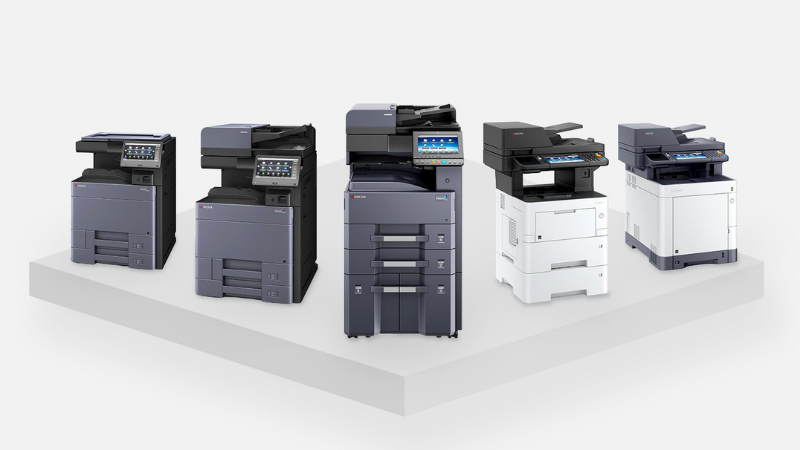
Having the right print fleet can provide:
- Lower printing and maintenance costs
- Faster document processing
- Better document security
- Improved workflow efficiency
- Reduced downtime and IT issues
Because there are many types of office printers available, understanding your business needs is the first step in choosing the right office printer for your organization.
Key Factors to Consider When Choosing the Right Office Printer
Before selecting a printer, it’s important to evaluate your organization’s daily workflow and printing demands.
1. Print Volume
One of the biggest considerations when shopping for office printers is your monthly print volume. Small offices that print occasionally will have very different needs than businesses producing thousands of pages per week. Higher-volume environments benefit from devices designed for durability and heavy workloads. These printers typically include larger paper capacities and longer-lasting components.
2. Print Speed
Print speed is measured in pages per minute (PPM). If your team regularly prints large documents or high volumes of reports, faster printing speeds can significantly improve productivity. Businesses with frequent print jobs should prioritize printers with higher PPM ratings to avoid workflow bottlenecks.
3. B&W vs. Color Printing
Another important factor to consider is whether your business requires monochrome or color printing.
- Black and white printers are often more cost-efficient for offices printing invoices, contracts, or internal documents.
- Color printers are useful for marketing materials, presentations, and client-facing documents where visual impact matters.
Many businesses benefit from a combination of both.
4. Multi-function Capabilities
Many modern offices prefer multi-function printers (MFPs) that combine several capabilities in one device.
These printers typically include:
- Printing
- Scanning
- Copying
- Faxing
- Digital document routing
- Document finishing (stapling, hole punching, etc)
Multifunction devices help consolidate equipment and simplify document workflows, making them a popular choice when choosing the right office printer.
5. Paper & Media Types
Different industries often require different paper sizes or media types. For example:
- Legal documents
- Labels
- Envelopes
- Marketing materials
It’s important to ensure the device you choose supports the paper sizes and tray capacities your business uses regularly.
6. Network & Cloud Integration
Today’s offices rely heavily on digital workflows. Modern printers can integrate directly with:
- Cloud storage platforms
- Email workflows
- Document management systems
- Mobile printing apps
If your team works remotely or uses cloud platforms, choosing a device with strong connectivity options is essential.
7. Security Features
Printer security is often overlooked but extremely important. Office printers can store sensitive data, making them potential security risks if not properly managed.
Look for devices that include features such as:
- User authentication
- Secure print release
- Data encryption
- Network monitoring
Built-in security features help protect confidential business information.
Do You Have The Right Printer Fleet For Your Business?
Choosing the right office printer is about more than just buying a machine. It’s about understanding your workflow, print volume, security requirements, and long-term operational costs.
By evaluating your needs and selecting the appropriate device, your business can improve efficiency, reduce downtime, and create a smoother document workflow.
If you’re unsure where to start, working with an experienced Managed Service Provider, like WTS, can help you evaluate your current printing environment and recommend the right solution for your business.
Let’s talk. 843-236-6436.
Ready for IT that WORKS for your business?
Schedule a 15-minute meeting with our team.
- Managed IT Services
- Business Phone Systems
- Managed Print
- Cybersecurity
- Cloud Services
- Data Cabling